pip Is Fighting Back: Lockfiles and Dependency Cooldowns Arrive in Version 26.1
Learn how pip 26.1 adds dependency cooldowns and standardized pylock.toml lockfile support. Explore practical workflows for improving Python dependency security and reproducible installations.


For years, pip has been the tool almost every Python developer uses.
However, newer tools such as Poetry, PDM, and uv have offered a more complete dependency-management experience: lockfiles, project workflows, and reproducible environments. And they are making pip seem too old to use.
pip 26.1 is a strong fight back.
Released on April 26, 2026, it added experimental support for installing from standardized pylock.toml files and made dependency cooldown policies practical.
These features create a practical workflow that many teams can adopt without replacing pip.
Let's see why this matters and how you can use it in a real project.
pip 26.1 Adds Two Different Security Controls
The two new features solve different problems:
- Dependency cooldown: Is this release old enough for the ecosystem to have inspected it?
pylock.tomlinstallation: Are we installing the exact dependency graph and artifacts we reviewed?
A cooldown reduces exposure to a malicious release immediately after publication.
A lockfile reduces unexpected changes between development, CI, and production.
Although they cannot replace code review, vulnerability scanning, hashes, or least-privilege CI. They are useful layers and fit into commands that Python teams already understand.
Dependency Cooldowns: Security Through Delayed Adoption
Normally, pip prefers the latest version that satisfies our constraints.
Imagine that our project allows this:
httpx>=0.28,<1If a new compatible version appears on the package index, the next clean build may install it immediately.
That is convenient when the release is good. It is dangerous when an attacker has compromised the maintainer's account or publishing workflow.
pip's --uploaded-prior-to option lets us reject candidates newer than a chosen cutoff. The option first appeared in pip 26.0 with an exact datetime. pip 26.1 added support for relative durations in days, which makes a repeatable cooldown policy much easier:
python -m pip install \
  --uploaded-prior-to=P7D \
  -r requirements.txt
P7D means pip only considers packages uploaded at least seven days ago.
We can also use an exact ISO 8601 date and time:
python -m pip install \
  --uploaded-prior-to=2026-06-01T00:00:00Z \
  -r requirements.txt
This is especially useful in automated dependency-update jobs. A seven-day delay gives maintainers, security researchers, package indexes, and early adopters time to notice suspicious behavior before our production pipeline accepts the release.
The option, by the way, only works with package indexes that provide upload-time metadata. It is also opt-in; upgrading pip does not automatically protect existing pipelines.
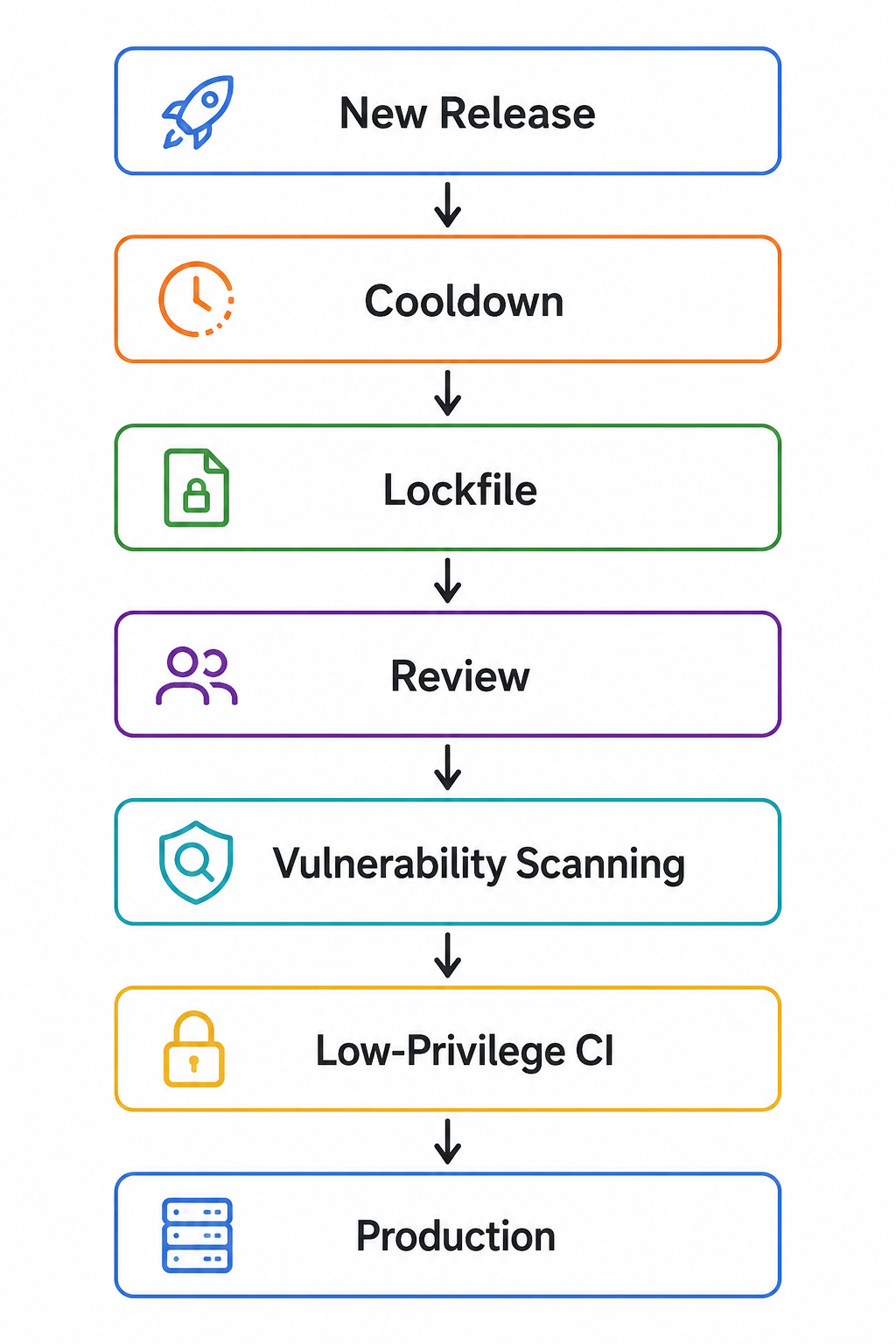
However, a cooldown can also delay urgent bug fixes, so it should be applied thoughtfully rather than blindly.
Pip Install from pylock.toml
Python had lacked a lockfile standard that different tools could understand.
We had poetry.lock, pdm.lock, uv.lock, requirements.txt, and several other formats. They work, but they belong to their own tools and workflows.
PEP 751 changed the direction by defining pylock.toml, a standardized TOML format for reproducible Python installations.
A lockfile can record details such as:
- exact package versions;
- dependency relationships;
- compatible environments;
- wheel and source-distribution files;
- download locations;
- upload times;
- cryptographic hashes.
For example, a simplified entry looks like this:
lock-version = "1.0"
requires-python = ">=3.12"

[[packages]]
name = "example-package"
version = "1.2.3"

[[packages.wheels]]
name = "example_package-1.2.3-py3-none-any.whl"
url = "https://files.pythonhosted.org/..."

[packages.wheels.hashes]
sha256 = "..."
This is different from a casual requirements.txt containing broad version ranges.
To adapt this new standard, pip 25.1 introduced an experimental pip lock command. It can generate pylock.toml:
python -m pip lock \
  -r requirements.in \
  -o pylock.toml
pip 26.1 added the missing half of the normal workflow: pip install can now read the standardized lockfile through -r:
python -m pip install -r pylock.tomlThat matters because pip remains available in environments where adopting a new package manager is difficult. Enterprise images, client systems, restricted build environments, and conservative teams may already have pip but not uv, Poetry, or PDM.
A standard becomes much more valuable when the default tool can consume it.
Should You Use These Features Today?
For a pip-centered application, I would start experimenting now.
Use dependency cooldowns in scheduled update automation. Generate pylock.toml, commit it, and install it in a test environment before changing production.
However, keep the word experimental in mind.
The official pip documentation still labels pip lock and pylock.toml support as experimental. pip's generated lockfile is only guaranteed for the current Python version and platform.
If you deploy to several targets, generate and test separate files where necessary:
pylock.linux.toml
pylock.macos.toml
pylock.windows.toml
If your team already uses uv, Poetry, or PDM successfully, do not migrate only because pip added a new feature. Consistent locked installs are more valuable than fashionable tool changes.
Key Takeaways
--uploaded-prior-toarrived in pip 26.0; pip 26.1 added reusable duration syntax such asP7D.- Cooldowns reduce exposure to brand-new malicious releases, but they can also delay urgent fixes.
- PEP 751 defines
pylock.tomlas a standard Python lockfile format. pip lockarrived experimentally in pip 25.1; pip 26.1 added experimental installation throughpip install -r pylock.toml.
Conclusion
Pip is showing its age comparing to modern Python package manager.
But pip 26.1 shows a useful change in direction.
pylock.toml brings standardization. Dependency cooldowns bring time. Together, they let conservative Python teams improve reproducibility and supply-chain security without rebuilding their entire toolchain.
My recommended starting point is simple:
python -m pip lock \
  --uploaded-prior-to=P7D \
  -r requirements.in \
  -o pylock.toml

python -m pip install -r pylock.toml